Posts

Showing posts with the label windows

Quick & Dirty Domain Controller Migration

It's the year 2023 now and it astounds me to know that there are still businesses running Active Directory and other domain services on Server 2003 and Server 2008 boxes. Migration of domain controller roles from old servers to new isn't as difficult as you might think. Honestly the hardest part is probably figuring out Microsoft licensing for Server 2019/2022. Over the last few years since upgrading our own domain controllers, I've helped others with the simple setup steps below.  Also, I'm assuming that anyone reading this is not a complete dunce when it comes to Windows Server and Active Directory because there's a lot of stuff around AD that I'm not taking time to spell out. (You can probably get away with being about a 75% dunce ;) just not a complete one.) QDDCM - Quick & Dirty DC Migration  (For On-Prem Active Directory Domain Services on Server 2019/2022 with GUI) I'm going to just dive right in here with out much preamble. Following this guide w...
Say No to Sh!tty Passwords

Image
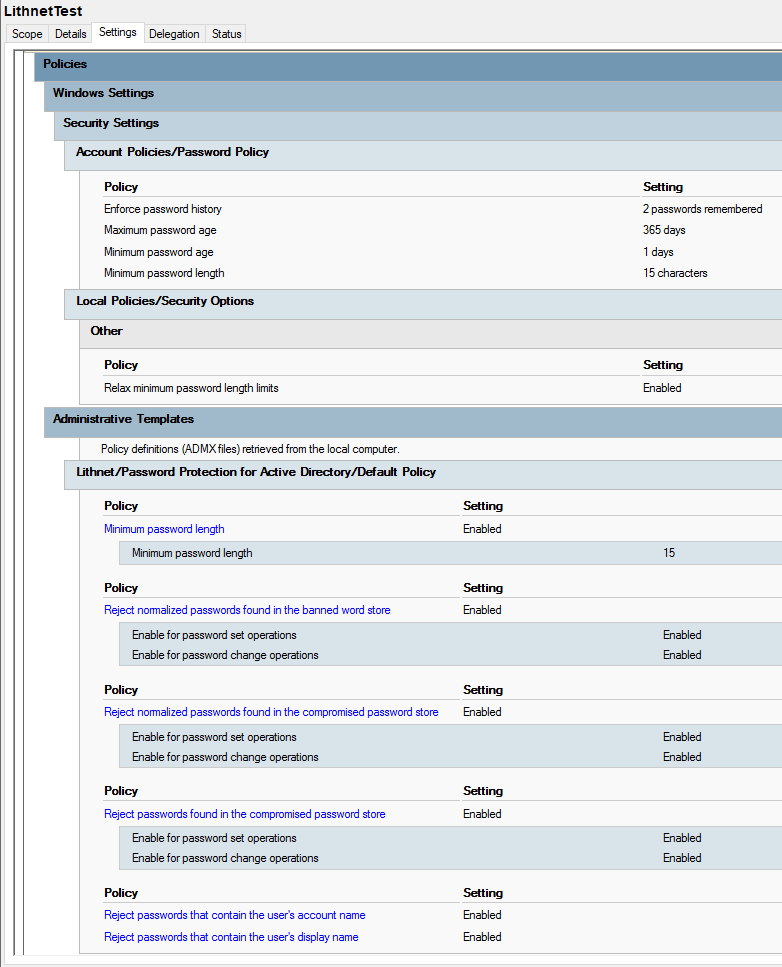
A couple of months ago, I shared some password policy advice as one of my Five Easy Security Wins in Windows . Changing your password policy to a 365-day expiration and 15-character minimum is easy and far more secure than shorter password requirements, but it isn't impossible for people to still set bad passwords. Without a password checker in place, users can still set truly terrible passwords for their Windows logins. I needed to change that in my environment, and in my search for just the right tool, I found Lithnet Password Protection (LPP) for Active Directory . I'll share some background info about why implementing LPP was necessary, and give a quick run-down on how to set it up on Domain Controllers.   Shitty Passwords Everywhere I have seen no shortage of truly awful passwords in my career as a sysadmin. For whatever reason, end users seem convinced that they need to tell IT what their passwords are if they need assistance. I have never really wanted to know people...

Running LAPS: No Blood, No Sweat, No Tears

Image
If the title scared you, don't let it. There's no physical effort to put forth in this hardening exercise, so you can safely continue to enjoy crunching down on Doritos dipped in peanut butter. (What? Just me on that one? Oof.) Anyway, to follow up on my Five Easy Security Wins in Windows post, I wanted to write about running LAPS. Because I'm not good at all with sport metaphors, let's just dive in. What is LAPS? LAPS stands for Local Administrator Password Solution, and it basically does what it says on the tin . As long as you use the same local administrator account name on your Windows endpoints, you'll be able to get LAPS set up in a matter of minutes. LAPS is a major and easy security win for Windows admins because it gives every endpoint a unique, randomized local administrator password. The passwords change as often as you tell them to, use whichever character sets you tell them to, and you can see what they are in the computer object's attributes in ...

Using *Nix Makes Me a Better Windows Sysadmin

Yes, you read the title correctly. Using *nix operating systems has indeed made me a better Windows sysadmin. It shouldn't be all too surprising, especially since the proclamation years ago that Microsoft <3s Linux , and I don't think systems administration should be played as an either/or game between Windows and Linux environments. There is so much that we Windows sysadmins can gain by taking deep dives into *nix operating systems as part of a healthy production environment. My experience with Ubuntu Server has made the biggest impact to me as a Windows sysadmin. In Windows environments, I'd grown accustomed to having the desktop experience (GUI) as the primary mode of getting everything done. Need to run an application? Click around. Need to set up a service to start automatically? Click around. Granted, with Windows Server OSes there is a headless (Core) option, but let's be honest and admit that probably none of us use it because it feels weird. In Ubuntu Server...

Five Easy Security Wins in Windows

Image
Every communication medium we've ever invented as humans has, at some point, been pressed into service as a malicious tool. A lot of us do what we can to use such tools for good, or at least for benign purposes. The worse-but-not-quite-worst of us humans love to hack, scam, and swindle others to get what they want. With Microsoft Windows having such a huge marketshare versus 9,001 flavors of Linux and Apple's Mac OS, MS's operating systems and programs are huge targets for malicious actors. As a Windows sysadmin first and foremost, I feel that pain and do what I can to keep my users safe. (Side note: I also love to waste scammers' time--if they're talking to or emailing me, they're not using that time to take advantage of someone more trusting and/or gullible.) And despite being primarily a Windows sysadmin, I'm also a lover of open-source-everything, ESPECIALLY knowledge. Below, I'm going to share five easy(ish) things you can implement to beef up your ...

Our Hypervisors are Singles Bars (Why I Love Single-Purpose Servers)

Image
Single-purpose servers are my hot mashed fruit. As a minimalist, I don't like clutter, and that extends into computing environments. Although it might sound kind of crazy to spin up a new server for every little thing, I promise it will make sense by the end of this post. From a management perspective, having single-purpose servers makes it so much easier to know which services are running where. Basically think of this like delegating tasks among team members to get projects done quickly and efficiently. I'm a documentation junkie, and it drives me bonkers when I see a server that's just got too much on its plate--we're not running a steakhouse here--keeping things simple keeps them running smoother. As a result of not cluttering servers with every possible service to run, my documentation stays clean and readable. Single-purpose setup also means that I can set the less mission-critical services and devices to update and restart in the middle of the day and have little...